

Description
Stop installing heavy plugin packs for just one widget.
Redesignee is the first Cloud-Based Component Library for WordPress. Unlike traditional Elementor Addons or Gutenberg block plugins that load huge CSS/JS files for features you don’t use, Redesignee injects only the clean code required for the specific widget you choose.
Browse a growing library of premium, lightweight layouts, customize them visually, and import them instantly. It’s the perfect solution for developers and designers who care about Core Web Vitals, PageSpeed, and clean code.
🚀 Why Choose Redesignee?
- Optimized Performance: We don’t load unused widgets on your server. If you pick one Elementor carousel, you only load code for that specific element.
- Dual Compatibility: Works seamlessly across both Elementor (as a widget) and Gutenberg / Block Editor (as a block).
- Visual Cloud Customizer: Edit content, colors, and layout in a live preview window.
- Performance First: Built specifically to help sites hit green scores on Google PageSpeed Insights.
📦 Included Widgets & Cloud Categories
We add new responsive layouts and components weekly directly to the cloud library without you needing to update the plugin.
- Hero & Video Elements: High-converting hero sections, background video blocks, and responsive video sliders.
- Sliders & Carousels: Draggable testimonial sliders, review cards, logo carousels, and responsive image sliders.
- Content & Layout Elements: SEO-friendly Accordions (FAQs), horizontal/vertical Tabs, Text elements, and Feature grids.
- Marketing & Services: Responsive Pricing Tables with toggles, Service showcase grids, Call to Action (CTA) banners, and “How It Works” step-by-step sections.
- Advanced Visuals: Responsive Timelines, About sections, custom Navigation Menus, and rich Image elements.
✨ Features
- Copy & Paste Workflow: Browse the cloud library, click “Import,” and your layout is ready.
- Smart Asset Loading: Assets are loaded dynamically only on the pages where your widgets actually exist.
- Clean Code Markup: The output is standard, standards-compliant HTML/CSS that blends perfectly with your active WordPress theme.
- Global Styles: Inherits your site’s native theme fonts and colors automatically.
- Live Sidebar Search: Instantly look up widgets by titles, tags, or descriptive text keywords across the cloud library collection.
- Undo & Redo History Control: Tweak layout styles, delete nodes, or arrange slide lists with instant shortcut rollback configurations.
- One-Click Domain Authorization: Instantly authorize staging or production environments using an automated centered popup configuration window.
3rd Party Service Disclaimer
This plugin relies on the Redesignee cloud service to function. It connects securely to the Redesignee API to fetch widget templates, library categories, and assets.
- This service is required to browse and import cloud widgets.
- An API Key (Free or Premium) is used to authenticate your request.
- Terms of Service
- Privacy Policy
Screenshots

Plugin Settings: The simple settings dashboard where you can manage your cloud connection. 
Gutenberg Support: Easily find and insert the Redesignee block directly from the WordPress block editor. 
Widget Library: Browse a visual catalog of categories like Hero sections, Timelines, Testimonials, and Services. 
Visual Editor: Customize text, layouts, and styles instantly using our intuitive cloud interface before importing. 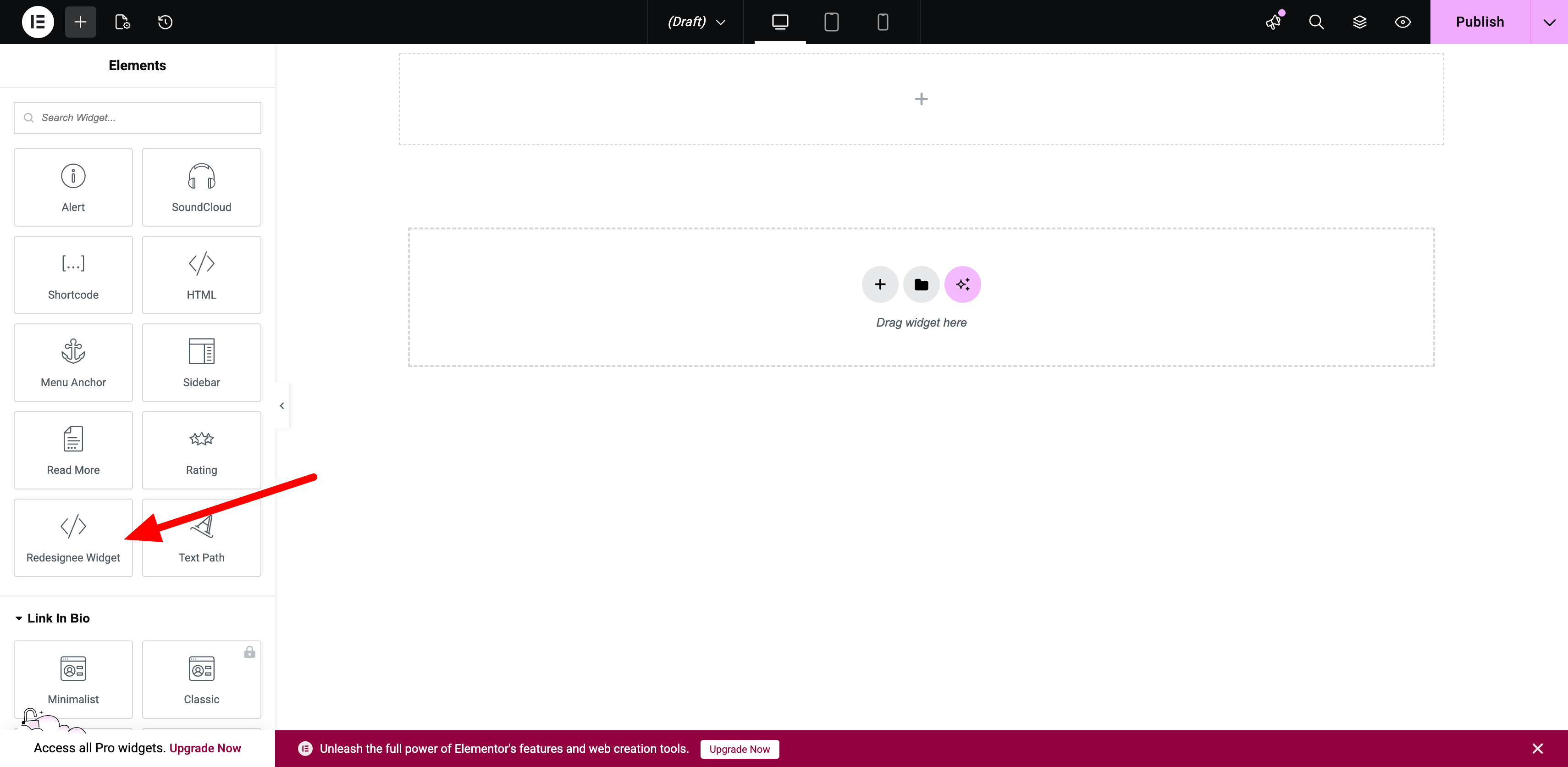
Elementor Integration: Drag and drop the Redesignee widget from the Elementor sidebar just like any native element. 
One-Click Access: Launch the cloud library directly from your page builder interface. 
Categorized Selection: Quickly filter through sections like Accordions, Carousels, and Video elements. 
Live Canvas Preview: See your selected widget fully rendered in real-time inside your editor canvas. 
Content Management: Smoothly manage items, links, icons, and descriptions via the editor sidebar.
Blocks
This plugin provides 1 block.
- Redesignee Widget
Installation
- Upload the plugin files to the
/wp-content/plugins/redesigneedirectory, or search for “Redesignee” in your WordPress admin plugin dashboard. - Activate the plugin through the ‘Plugins’ screen in WordPress.
- Go to Redesignee Settings in your dashboard (Optional: enter your API key for premium items).
- For Elementor: Search for the “Redesignee” widget in your Elementor editor sidebar.
- For Gutenberg: Click the “+” block inserter button and search for the “Redesignee” block.
FAQ
-
Is this an Elementor Addon or a Gutenberg Block?
-
It is both! The plugin detects which editor you are actively using and provides a native experience for that ecosystem. You can use it on a site that uses Elementor for landing pages and Gutenberg for blog posts.
-
Will this slow down my website?
-
No. This is the core problem Redesignee solves. Unlike traditional “Ultimate Addons” packages that load massive CSS/JS files site-wide, Redesignee only injects the tiny code footprint for the specific element you import.
-
Are there free widgets available?
-
Yes! We offer a generous selection of free cloud widgets, including sliders, testimonials, timelines, and pricing tables. No credit card is required to use the free library tier.
-
Can I use this on client sites?
-
Absolutely. The output is clean, standard HTML/CSS/JS. If you have a Premium account, our commercial license fully covers your client projects.
-
What happens if I uninstall the plugin?
-
Your imported widgets will remain on your pages as standard HTML elements, but you will lose the ability to edit them visually via the cloud customizer or import new layouts.
Reviews
There are no reviews for this plugin.
Contributors & Developers
“Redesignee – Cloud Widgets for Elementor & Gutenberg” is open source software. The following people have contributed to this plugin.
Contributors
Translate “Redesignee – Cloud Widgets for Elementor & Gutenberg” into your language.
Interested in development?
Browse the code, check out the SVN repository, or subscribe to the development log by RSS.
Changelog
1.0.4
- Fix: Patched automatic item renumbering fallback inside structural layout engines to ignore multi-digit numbers (like timeline years), preserving custom dates exactly as written.
- Fix: Resolved an unhandled 403 AJAX server error string by introducing an explicit error handler callback that drops users smoothly into the public free-tier library tier when a domain is unauthorized.
- Improvement: Swapped background option polling with a clean on-load API verification cycle to automatically demote plugin status back to “Authorize this domain” if it is removed from the cloud dashboard settings panel.
- Improvement: Programmed the verification script loop to trigger an explicit click sequence over native WordPress system submit buttons for immediate canvas refreshes.
1.0.3
- Feature: Added full text search to the library window, looking across widget names, tags, and description strings natively via the server API.
- Feature: Integrated full Undo/Redo historical state machine tracking system (with Ctrl+Z / Ctrl+Y shortcut keys) to capture typing, element mutations, slide list adjustments, and list reordering seamlessly.
- Improvement: Swapped modal buttons text from “Edit Widget” to “Edit in Live Editor” for clearer UI labeling flow.
1.0.2
- Fix: Patched customizer slide deletion loops to properly refresh preview iframes consistently.
- Fix: Corrected SVG vector link regex mapping to resolve circular text-on-path clipping issues.
- Improvement: Verified core asset parsing compatibility metrics with WordPress 7.0.
1.0.1
- Fix: Resolved an issue where Rich Text content (bold, lists, links) would sometimes appear empty in the editor.
- Fix: Fixed a bug where custom CSS modifications would revert to defaults when editing an existing widget.
- Fix: Improved state management to prevent overwriting manual code edits during the save process.
- Improvement: Enhanced visual editor stability for complex nested elements.
1.0.0
- Initial release.
- Added support for Elementor and Gutenberg blocks.
- Launched Cloud Library dynamic sync.