Title: Attachments
Author: Jon Christopher
Published: Mijdar 2, 2009
Last modified: Kanûn 30, 2025
---
Search plugins

# Attachments
By [Jon Christopher](https://profiles.wordpress.org/jchristopher/)
[Download](https://downloads.wordpress.org/plugin/attachments.3.5.11.zip)
* [Details](https://kmr.wordpress.org/plugins/attachments/#description)
* [Reviews](https://kmr.wordpress.org/plugins/attachments/#reviews)
* [Installation](https://kmr.wordpress.org/plugins/attachments/#installation)
* [Development](https://kmr.wordpress.org/plugins/attachments/#developers)
[Support](https://wordpress.org/support/plugin/attachments/)
## Description
**Extensive** usage instructions are [available on GitHub](https://github.com/jchristopher/attachments/#attachments)
Attachments allows you to simply append any number of items from your WordPress
Media Library to Posts, Pages, and Custom Post Types.
#### Associate Media items with posts
The idea behind Attachments is to give developers the ability to directly associate
Media items with any post. This is accomplished by adding a meta box to post edit
screens as determined by the developer. Once Media items have been associated with
a post, you’re able to retrieve those Attachments and include them directly within
your template files using any specific markup you wish.
#### Integrate Attachments within your theme with fine grained control
**Attachments does not automatically integrate itself with your theme.** Since the
idea behind Attachments is to allow integration of Media within posts using developer-
crafted, unique markup, _it’s up to you to integrate with your theme_. The most
basic integration includes editing the [appropriate template file](https://codex.wordpress.org/Template_Hierarchy)
and adding your call(s) to Attachments. For example, if you have set up Attachments
to be used with your Posts entries, edit `single.php` to include the following within
The Loop:
```
exist() ) : ?>
Attachments
Total Attachments: total(); ?>
get() ) : ?>
-
ID: id(); ?>
Type: type(); ?>
Subtype: subtype(); ?>
URL: url(); ?>
Image: image( 'thumbnail' ); ?>
Source: src( 'full' ); ?>
Size: filesize(); ?>
Title Field: field( 'title' ); ?>
Caption Field: field( 'caption' ); ?>
```
That snippet will request all of the existing Attachments defined for the current
Post within The Loop, and retrieve each itemized property for that Attachment. Using
the provided details you’re able to integrate the attached Media items in any way
you please.
There is a lot more information on [Attachments’ GitHub page](https://github.com/jchristopher/attachments).
Please contribute!
### Roadmap
Please see [Attachments on GitHub](https://github.com/jchristopher/attachments/blob/master/docs/roadmap.md)
### Usage
**Extensive** usage instructions are [available on GitHub](https://github.com/jchristopher/attachments/blob/master/docs/usage.md)
## Screenshots
* [[
* An Attachments meta box sitting below the content editor
* [[
* Direct integration with WordPress 3.5+ Media
* [[
* Attach multiple files at once
* [[
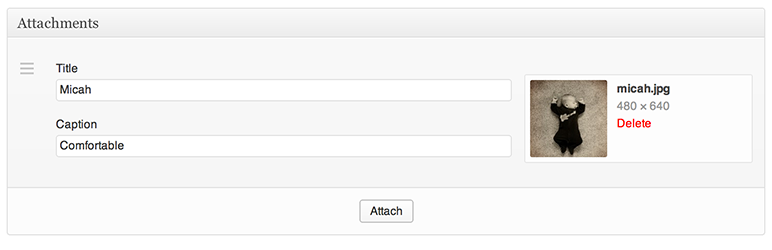
* Custom fields for each Attachment
* [[
* Drag and drop to sort
## Installation
1. Download the plugin and extract the files
2. Upload `attachments` to your `~/wp-content/plugins/` directory
3. Activate the plugin through the ‘Plugins’ menu in WordPress
4. Implement Attachments in your theme’s `functions.php` or your own plugin (see **
Other Notes > Usage**)
5. Update your templates where applicable (see **Other Notes > Usage**)
#### Upgrading from version 1.x
**You will need to update your theme files that use Attachments 3.0**. Version 1.
x of Attachments has been **fully deprecated** but is still available _and included
with Attachments 3.x_. If you would like to continue to use the (no longer supported)
1.x version you may add the following to your `wp-config.php`:
```
define( 'ATTACHMENTS_LEGACY', true ); // force the legacy version of Attachments
```
Version 3 is a _major_ rewrite. While I’ve taken precautions in ensuring you won’t
lose any saved data it is important to back up your database prior to upgrading
in case something goes wrong. This version is a complete rewrite so all legacy data
will be left in place, but a migration must take place to match the new data storage
model and workflow.
## FAQ
### Frequently Asked Questions
Please see [Issues on GitHub](https://github.com/jchristopher/attachments/issues)
## Reviews

### [Great for dynamic Elementor Image Carousel](https://wordpress.org/support/topic/great-for-dynamic-elementor-image-carousel/)
[MaryMak](https://profiles.wordpress.org/maxms/) Hezîran 17, 2022
This might be a rare use case, but I have a custom post type loop template where
I show an image carousel of photos for that post type. I’m using Elementor with
Ele Custom Skin to create the template. The image carousel has two dynamic options:“
Post Image Attachments” or “ACF Gallery Field”. Rather than paying for ACF Pro to
add an image gallery field, this plugin works perfectly to allow my client to select
photos for the carousel.

### [Perfect for file sharing](https://wordpress.org/support/topic/perfect-for-file-upload/)
[shayakraut](https://profiles.wordpress.org/shayakraut/) Nîsan 25, 2022
This plugin works perfectly for what I needed–created an interface on a custom post
type edit screen for the contributor to upload files, and add a description. Contributors
can add their own links in the block editor, but this makes the process very straightforward
for novice WP users. I am using it for a lesson plan/resource sharing site for teachers.
The plugin adds the files to the Media Library. The output can be styled to look
just like you want it on the front-end–users click icons to download the files they
want.

### [Grate Plugin](https://wordpress.org/support/topic/grate-plugin-36/)
[mthriyad](https://profiles.wordpress.org/mthriyad/) Mijdar 4, 2020
It was a simple and user-friendly plugin. I’ve used this in WordPress’s latest version
and it’s still working fine.

### [Easy and great plugin](https://wordpress.org/support/topic/easy-and-great-plugin-13/)
[conci](https://profiles.wordpress.org/conci/) Hezîran 7, 2020
Very simple to use and easy to integrate. Congrats and thanks!

### [Excellent Plugin](https://wordpress.org/support/topic/excellent-plugin-4991/)
[Imtiaz Ahmed](https://profiles.wordpress.org/imtiazepu/) Tîrmeh 7, 2019
Great experience with Attachments.

### [Works perfectly](https://wordpress.org/support/topic/works-perfectly-285/)
[amauripump](https://profiles.wordpress.org/amauripump/) Hezîran 2, 2018
A very useful plugin. Saves me a lot of time, once I needed to attach a variable
number of files to a custom post type, and list them. Thanks, I’ll translate it
to Brazilian Portuguese to help.
[ Read all 53 reviews ](https://wordpress.org/support/plugin/attachments/reviews/)
## Contributors & Developers
“Attachments” is open source software. The following people have contributed to
this plugin.
Contributors
* [ Jon Christopher ](https://profiles.wordpress.org/jchristopher/)
[Translate “Attachments” into your language.](https://translate.wordpress.org/projects/wp-plugins/attachments)
### Interested in development?
[Browse the code](https://plugins.trac.wordpress.org/browser/attachments/), check
out the [SVN repository](https://plugins.svn.wordpress.org/attachments/), or subscribe
to the [development log](https://plugins.trac.wordpress.org/log/attachments/) by
[RSS](https://plugins.trac.wordpress.org/log/attachments/?limit=100&mode=stop_on_copy&format=rss).
## Changelog
Please see [Attachments’ changelog on GitHub](https://github.com/jchristopher/attachments/blob/master/docs/changelog.md)
#### 3.5.11
* Compatibility with WordPress 6.9
* Fixes Fatal Error in some cases when deleting. Props [m-hefti](https://github.com/jchristopher/attachments/pull/194)
* Fixes field value population for non-English values. Props [marcochiesi](https://github.com/jchristopher/attachments/pull/188)
* Fixed bug in generated code for migration from Attachments Pro Props [marcochiesi](https://github.com/jchristopher/attachments/pull/185)
* Fix documentation links on WordPress plugins page. Props [crgeary](https://github.com/jchristopher/attachments/pull/176)
#### 3.5.9
* Added link to collapse Attachments to make sorting easier
* Fixes PHP Notice on installation
* Fixes illegal offset error on PHP7
* Added Dutch translation
#### 3.5.8
* Fixed a potential issue when migrating from Attachments Pro
#### 3.5.7
* Fixed a regression that prevented attaching multiple files at once
#### 3.5.6
* Fixed an issue where changing an Attachment on more than one Attachment would
continually update the first Attachment
* Media modal now includes filters (props marcochiesi)
* Added German translation (props bessl)
* Added filter to manipulate Attachments metadata before it’s saved: `attachments_meta_before_save`
* Underscores are no longer enforced over hyphens
* More entropy for Attachments uid’s to prevent collisions (props sketchpad)
#### 3.5.5
* Fixed an issue where field values were improperly overwritten when the instance
was set to prepend in some cases
#### 3.5.4
* Fixed assumption of field keys (props bukka)
* Improved documentation (props Lane Goldberg, Roman Kokarev, Ore Landau)
* Added `rewind()` method to reset Attachments reference array (props joost de
keijzer)
* TinyMCE fix to support WordPress 3.9+
* Fixed an issue where nonce was potentially wrongly flagged as sent if an instance
was filtered
* Added `post_parent` argument support for instances, setting to `true` will populate
the **Uploaded to** column in Media
* New filter: `attachments_default_instance` to disable/enable the default instance(
default is `true`, `ATTACHMENTS_DEFAULT_INSTANCE` constant is deprecated)
* New filter: `attachments_settings_screen` to hide/show the settings screen (default
is `true`, `ATTACHMENTS_SETTINGS_SCREEN` constant is deprecated)
* Fixed an issue where Attachments meta box(es) would not show up when creating
new posts whose `post_type` had a dash in it
* Updated Italian translation (props Luca Speranza)
#### 3.5.3
* Cleaned up PHP Warning/Notice (props Mike C.)
* Fixed a potential fatal error triggered by deleting something from the Media
library that was an Attachment
* Tested with WordPress 3.7
#### 3.5.2
* Fixed an issue where newline characters may not be properly retrieved
* Fixed an issue with localization not initializing properly
* Resolved a PHP Strict warning (props @bukka)
#### 3.5.1.1
* Fixed an issue where Featured Images may have become inadvertently disabled,
props @deborre
#### 3.5.1
* Fixed an issue where changing an Attachment changed all attachments, props @bartoszwww
* Fixed an issue where certain Unicode characters weren’t decoded properly, props
@stuk88
#### 3.5
* Initial implementation of limiting the number of Attachments
* You can now change an Attachment asset without having to remove the entire Attachment
and re-add something new
* New filter: `attachments_location_{my_instance}` (where `**{my_instance}**` is
your instance name) allows for more fine-grained control over where meta boxes
show up (e.g. limiting to your Home page)
* New action: `attachments_extension` facilitates Attachments extensions
* New method `width( $size )` to retrieve the width of the current Attachment
* New method `height( $size )` to retrieve the height of the current Attachment
* New document structure, various additions to documentation
* Attachments Pro migration script. If you’ve been waiting to migrate from Attachments
Pro please **back up your database** and run the migration script.
* Fixed an asset URL issue if Attachments is added as a must-use plugin
* Italian translation (props Marco Chiesi)
#### 3.4.3
* Attachments now takes into account media deleted outside Attachments meta boxes
and removes deleted attachments automatically
* Added working Polish translation, props [@mleczakm](https://github.com/mleczakm)
#### 3.4.2.1
* Fixed a regression that prevented the `type` method from returning
#### 3.4.2
* Fixed an issue where the `languages` directory wouldn’t be utilized for l10n
* Search now respects custom `meta_key`
* You can now pass in a `filetype` parameter when searching to limit results in
that way
#### 3.4.1
* Class abstraction and cleanup
* Better support for plugin-created custom image sizes
#### 3.4
* New filter: `attachments_meta_key` facilitates using a different meta key for
Attachments storage
* New filter: `attachments_get_ **{my_instance}**` (where `**{my_instance}**` is
your instance name) allows you to filter Attachments per instance once they’ve
been retrieved
* Fixed an issue where retrieving single Attachments didn’t properly pass the index
to attribute methods
* Fixed PHP Warnings when Network Activating
* You can now have new Attachments _prepend_ the list instead of append by setting`
append => false` in your instance
#### 3.3.3
* Fixed a PHP Warning when activated using Multisite
* Slightly modified the migration process to better handle plugins like WPML (props
sebastian.friedrich)
#### 3.3.2
* You can now specify which view is default when browsing the Media modal (e.g.
have ‘Upload Files’ be default instead of ‘Media Library’)
#### 3.3.1
* Added meta box positioning arguments when registering instances
* Cleaned up some CSS when Attachments instances are in the sidebar
#### 3.3
* Added a `search()` method to allow searching for Attachments based on their attributes(
e.g. attachment ID, post ID, post type, field values, etc.)
* Improved the ‘Remove’ animation
* New field: select
* New parameter for Attachments attributes methods. You can pass the index (`int`)
of the Attachment you’d like to utilize when firing the method.
#### 3.2
* Added option to disable the Settings screen
* Added the ability to set a default for fields using the metadata that exists
in WordPress. Available defaults include: title, caption, alt, and description.
If set, the metadata for the correlating field will be used as the field default
when initially adding an Attachment from the Media modal. Only applies to text,
textarea, and wysiwyg fields.
* Added a `get_single()` method that allows you to specifically retrieve a single
Attachment
* Clarified some documentation
#### 3.1.4
* Changed ‘Delete’ to ‘Remove’ so as to not make it sound like the file itself
would be deleted from Media (props Lane Goldberg)
* Better handling of posts that have no Attachments when saving
#### 3.1.3
* Fixed a potential issue with the WYSIWYG field not working on CPT without editor
support
* Field assets are less aggressive and only fire when necessary
* Reorganized the migration process a bit in prep for Attachments Pro support
#### 3.1.2
* Fixed a regression that prevented successful migration of legacy Attachments
data
#### 3.1.1
* Fixed a Fatal Error when registering the text field
#### 3.1
* New field: wysiwyg
* Fields will now properly respect line breaks
* Fields will now properly return HTML instead of escaped HTML
#### 3.0.9
* Fixed an issue where special characters would break title/caption fields during
migration
#### 3.0.8.2
* Fixed a CSS issue with only one text field
#### 3.0.8.1
* Better storage of special characters for PHP 5.4+
#### 3.0.8
* Fixed an issue in Firefox where you weren’t able to focus inputs unless you clicked
their label
* New field: textarea
#### 3.0.7
* Proper sanitization of Custom Post Type names (as WordPress does it)
#### 3.0.6
* Fixed a possible JavaScript error if an Attachment that’s an image doesn’t have
a proper thumbnail URL
* Added a `total()` method that will return the number of Attachments for the current
instance
* When requesting the `image()` for a non-image Attachment, the WordPress-defined
icon will be returned
* Added an `icon()` method that will return the WordPress-defined icon for the
Attachment
* Cleaned up a PHP Warning when trying to save for an undefined field type
* Fixed an issue where template tags would be output for non-image Attachments
after saving
#### 3.0.5
* Fixed a regression in handling Custom Post Type names that would too aggressively
interfere with instance regustration
* Fixed an issue when working with non-image Attachments
#### 3.0.4
* Fixed an issue that prevented the choosing of a Featured Image for a Custom Post
Type if Attachments was activated
* Attachments now only enqueues its assets on edit screens that actually utilize
Attachments
* Fixed a potential JavaScript error triggered when a ‘thumbnail’ image size was
not available
* Prevented incorrect usage of dashes used in CPT names for post_type argument
when registering Attachments instances (fixes an integration issue with WP e-
Commerce)
* Prevented re-running of migration process to avoid duplicates (e.g. on browser
reload)
#### 3.0.3
* Fixed an issue that prevented defining a post ID when retrieving Attachments
outside The Loop
* Cleaned up potential PHP warning when Attachments were requested for a post that
had none
#### 3.0.2
* Fixed an issue where some HTML entities were not properly stored
#### 3.0.1
* Fixed an issue where legacy mode was always enabled
#### 3.0
* **Major** rewrite. After three years of development, Attachments has been rewritten
to make
even better use of what WordPress has to offer
* Utilizes the brand spanking new 3.5 Media workflow
* Configuration now takes place within your theme or a plugin
* Multiple meta boxes! You can segment groups of Attachments with new instances,
each unique
* Dynamic fields! You can manipulate which fields each instance uses
* File type limits. Limit which files are available to Attachments (e.g. images,
audio, video)
## Meta
* Version **3.5.11**
* Last updated **3 meh ago**
* Active installations **9,000+**
* WordPress version ** 3.0 or higher **
* Tested up to **6.9.4**
* Language
* [English (US)](https://wordpress.org/plugins/attachments/)
* Tags
* [attachment](https://kmr.wordpress.org/plugins/tags/attachment/)[page](https://kmr.wordpress.org/plugins/tags/page/)
[pdf](https://kmr.wordpress.org/plugins/tags/pdf/)[picture](https://kmr.wordpress.org/plugins/tags/picture/)
[post](https://kmr.wordpress.org/plugins/tags/post/)
* [Advanced View](https://kmr.wordpress.org/plugins/attachments/advanced/)
## Ratings
4.8 out of 5 stars.
* [ 49 5-star reviews ](https://wordpress.org/support/plugin/attachments/reviews/?filter=5)
* [ 2 4-star reviews ](https://wordpress.org/support/plugin/attachments/reviews/?filter=4)
* [ 1 3-star review ](https://wordpress.org/support/plugin/attachments/reviews/?filter=3)
* [ 0 2-star reviews ](https://wordpress.org/support/plugin/attachments/reviews/?filter=2)
* [ 1 1-star review ](https://wordpress.org/support/plugin/attachments/reviews/?filter=1)
[Your review](https://wordpress.org/support/plugin/attachments/reviews/#new-post)
[See all reviews](https://wordpress.org/support/plugin/attachments/reviews/)
## Contributors
* [ Jon Christopher ](https://profiles.wordpress.org/jchristopher/)
## Support
Got something to say? Need help?
[View support forum](https://wordpress.org/support/plugin/attachments/)