

Description
InDesign Random Quotes allows you to effortlessly display beautiful, engaging quotes anywhere on your site. Choose between a vast, curated “Universal” collection of 100 popular global quotes or easily build your own “Manual” custom list using the Quote Studio dashboard.
Whether you want to show a simple, elegant random quote that changes on every page load, or a modern, auto-fading slideshow carousel that cycles through your collection dynamically, this plugin has you covered with 16 stunning, professional design templates ready to use via simple shortcodes.
Key Features
- 16 Stunning Design Templates: Choose from Classic, Modern Blockquote, Minimalist, Gradient Card, Glassmorphism, Gradient Border, Dark Sleek, Quote Bubble, Elegant Serif, Neon Glow, Paper Note, Brutalist, Typewriter, Floating Shadow, Cyber Punk, and Retro Wave.
- Auto-Fading Carousel Module: Display all of your quotes in a dynamic, smooth-fading slideshow cycle, perfectly embedded in any of the 16 layout themes! Customize the fade speed in seconds.
- Random Quote Loader: Simple and fast shortcode to pull and display a single random quote on every page load.
- Dedicated Quote Studio Dashboard: A beautiful new “ID Quotes” top-level admin menu lets you toggle between Universal and Manual modes, and view live, styling-accurate previews of all 16 layouts.
- “Quick Add” Form: Manually entering quotes is a breeze with our aesthetic, user-friendly “Quick Add” input fields for the quote text and author.
- 1-Click Shortcode Copy: Instantly copy perfectly formatted shortcodes for any layout directly from the admin dashboard’s live preview grid.
- Clean Formatting: Total control over author prefixes. Display your authors exactly how you type them without forced dashes or symbols.
Standard Layout Usage
You can customize the exact look and feel of your random quote using the layout attribute:
- Classic (Default):
[id_popular_quotes layout="classic"] - Modern Blockquote:
[id_popular_quotes layout="modern"] - Minimalist:
[id_popular_quotes layout="minimal"] - Gradient Card:
[id_popular_quotes layout="card"] - Glassmorphism:
[id_popular_quotes layout="glass"] - Gradient Border:
[id_popular_quotes layout="gradient-border"] - Dark Sleek:
[id_popular_quotes layout="dark-sleek"] - Quote Bubble:
[id_popular_quotes layout="bubble"] - Elegant Serif:
[id_popular_quotes layout="elegant-serif"] - Neon Glow:
[id_popular_quotes layout="neon-glow"] - Paper Note:
[id_popular_quotes layout="paper-note"] - Brutalist:
[id_popular_quotes layout="brutalist"] - Typewriter:
[id_popular_quotes layout="typewriter"] - Floating Shadow:
[id_popular_quotes layout="floating-shadow"] - Cyber Punk:
[id_popular_quotes layout="cyber-punk"] - Retro Wave:
[id_popular_quotes layout="retro-wave"]
Fade Carousel Usage
Display your quotes in a beautiful auto-fading carousel using the new [id_popular_quotes_carousel] shortcode! The carousel randomly shuffles your entire quote collection and smoothly transitions between them.
- Basic Carousel:
[id_popular_quotes_carousel] - Custom Speed: Change the fade speed in seconds (default is 10). Example:
[id_popular_quotes_carousel layout="neon-glow" speed="15"]
You can customize the carousel to use any of the 16 layouts:
- Classic (Default):
[id_popular_quotes_carousel layout="classic"] - Modern Blockquote:
[id_popular_quotes_carousel layout="modern"] - Minimalist:
[id_popular_quotes_carousel layout="minimal"] - Gradient Card:
[id_popular_quotes_carousel layout="card"] - Glassmorphism:
[id_popular_quotes_carousel layout="glass"] - Gradient Border:
[id_popular_quotes_carousel layout="gradient-border"] - Dark Sleek:
[id_popular_quotes_carousel layout="dark-sleek"] - Quote Bubble:
[id_popular_quotes_carousel layout="bubble"] - Elegant Serif:
[id_popular_quotes_carousel layout="elegant-serif"] - Neon Glow:
[id_popular_quotes_carousel layout="neon-glow"] - Paper Note:
[id_popular_quotes_carousel layout="paper-note"] - Brutalist:
[id_popular_quotes_carousel layout="brutalist"] - Typewriter:
[id_popular_quotes_carousel layout="typewriter"] - Floating Shadow:
[id_popular_quotes_carousel layout="floating-shadow"] - Cyber Punk:
[id_popular_quotes_carousel layout="cyber-punk"] - Retro Wave:
[id_popular_quotes_carousel layout="retro-wave"]
Screenshots
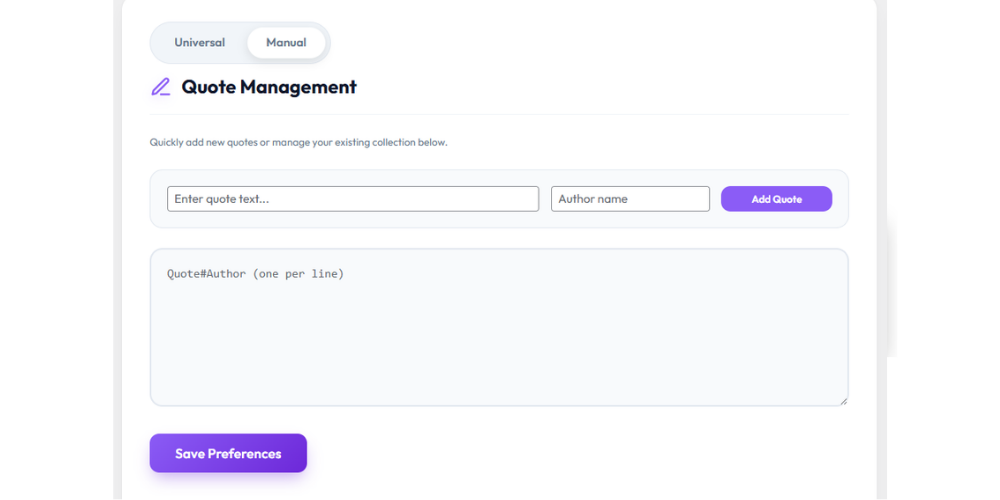
Screenshot showing plugin directory. 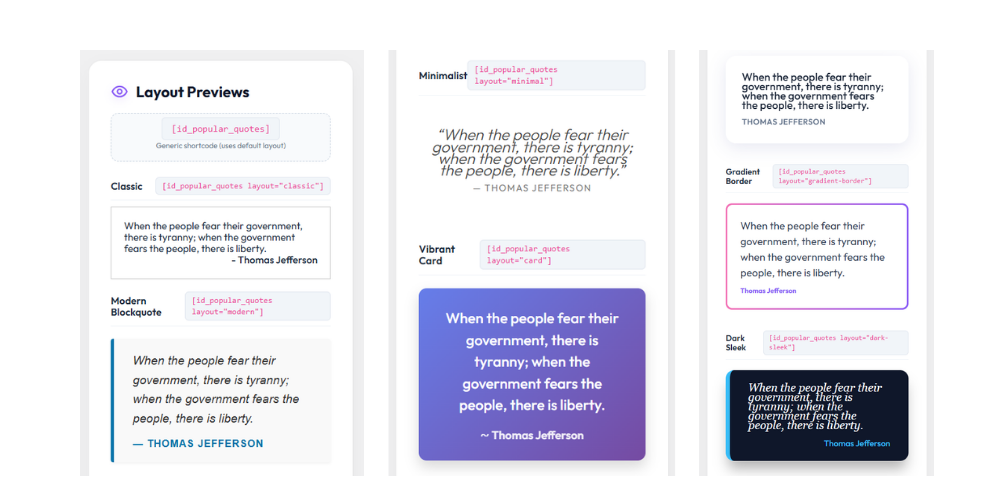
Screenshot showing shortcode usage with layouts.
Installation
- Upload the folder
idquotesto the/wp-content/pluginsdirectory. - Activate the plugin through the ‘Plugins’ menu in WordPress.
- Manage your custom quotes from the new ID Quotes item in the main admin menu.
- Add the shortcode
[id_popular_quotes]to display a single random quote, or use[id_popular_quotes_carousel]to display a fading slideshow of your quotes.
FAQ
-
My template doesn’t allow for widgets in the header. How can I add this?
-
There are many good resources available online that discuss this very thing. Search for ‘WordPress add a template widget area’ to see several. Be warned this will require some code editing in your template files. If you’re not comfortable with this consider hiring a web designer to do this.
Reviews


Contributors & Developers
“InDesign Random Quotes” is open source software. The following people have contributed to this plugin.
Contributors
Translate “InDesign Random Quotes” into your language.
Interested in development?
Browse the code, check out the SVN repository, or subscribe to the development log by RSS.
Changelog
1.3
- Feature: Doubled the number of available layouts from 8 to 16, including gorgeous new themes like Elegant Serif, Cyber Punk, Floating Shadow, Neon Glow, and Retro Wave.
- Feature: Added the powerful all-new
[id_popular_quotes_carousel]shortcode module to display an auto-fading, timed carousel cycle of your quotes using any layout! - Enhancement: Major aesthetic upgrade to the Quote Studio dashboard with premium UI styling, responsive two-column grid, and stacked live preview items.
- Enhancement: Dedicated “1-Click Copy” shortcode variants for both Random and Carousel quotes directly on all 16 layouts in the Dashboard.
- Enhancement: “Quick Add” form UI for easy custom quote ingestion.
- Enhancement: Upgraded the built-in Universal Quotes collection to feature exactly 100 of the most powerful, globally recognized historical quotes.
- Fix: Completely eliminated forced hardcoded author name dashes across all CSS and PHP themes.
1.2
- Enhancement: Moved the ID Quotes settings panel to a dedicated top-level main menu item for quicker access.
- Security: Added text sanitization callbacks for settings storage, adhering strictly to WordPress security standards.
1.1
- Feature: Added a dedicated Admin Page (ID Quotes in the main menu) to easily manage and add custom quotes.
- Feature: Added new
layoutattributes to the shortcode to support multiple design styles. - Fix/Improvement: Updated shortcode to properly return output instead of echoing it, adhering to WordPress standards.
1.0
- Initial release.